Prefetch is a digital forensic artifact falling under the on-disk category since it is stored in the Windows file system.
Prefetch was originally designed by Windows to improve application startup performance. Windows uses the information stored in Prefetch files to determine which files and resources an application frequently requires and to load them more efficiently on subsequent executions. But that information still exists on disk and can also be valuable forensic evidence.
What is Prefetch?
Prefetch is a technique used by Windows to speed up the loading of applications. Think of it as a cache. If Windows knows which dependencies an application will need and where the dependencies are located, it can fetch them faster.
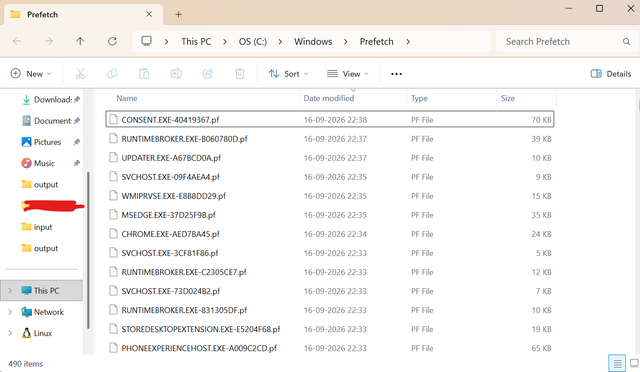
The prefetch folder is located at C:\Windows\Prefetch and is full of .pf files. Each file is associated with an application. The name of the file is in the format ABC.EXE-8digits.pf. It is a useful thing to note because sometimes files can have the same name in different folders. The 8 digits or numbers are derived from the file location (path) and historically used to contain the arguments it was run with too. The algorithm is private, and not a lot can be told from the hash.
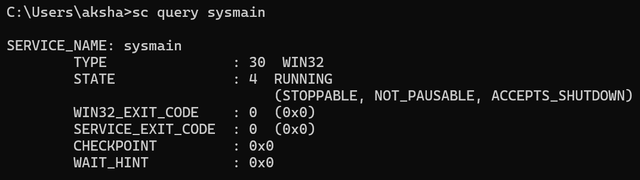
Prefetch is related under the Sysmain service, which,h like every other service, operates under the svchost.exe process. The service being turned off means no new prefetch entries will be created and no old ones will be modified. During an investigation, we must look at the uptime of the sysmain service to ensure it was not terminated to bypass logging.
Prefetch files also come in different format versions depending on the Windows release. Versions 17, 23, and 26 correspond to Windows XP/Vista/7, while versions 30 and 31 are used on Windows 8.1, 10, and 11. This matters forensically because version 30+ files store the last 8 execution timestamps, not just one, giving investigators a much richer execution timeline than older systems allow.
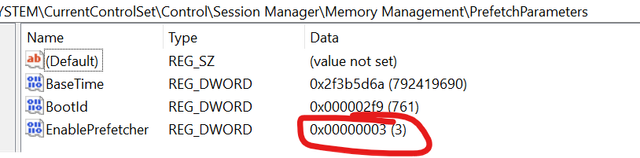
It’s also worth understanding the PrefetchParameters registry value itself, since we reference it later: 0 disables prefetching entirely, 1 enables application prefetching only, 2 enables boot prefetching only, and 3 (the default) enables both.
What Information Does Prefetch Contain?
While discussing the structure of prefetch files is not in the scope of this article, we shall be discussing the important information that can be extracted from them during an incident investigation.
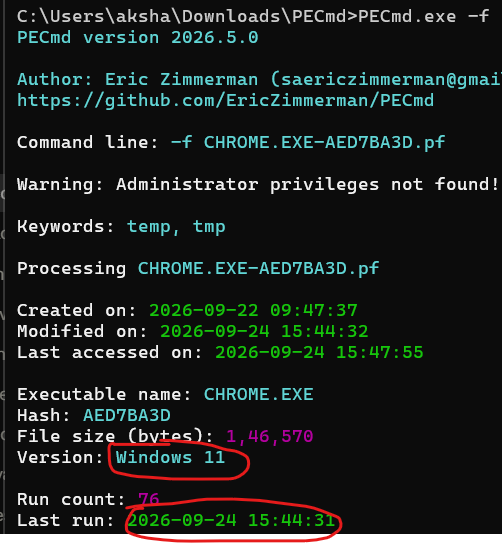
- Proof of Execution: Every time an executable is run, normally, the prefetch file is modified (exceptions covered later). Using this, we can prove execution of a file, possibly malicious. The .pf file’s creation and modification times approximate the first and most recent runs. The timestamps stored inside the file (the last 8 runs on Windows 8 and later) are more reliable; Windows also takes a second or so to write to the files.
- Referenced Files and Directories: We can extract an exhaustive list of all files and directories the execution of the executable preloaded. Including the path of the executable itself.
Note: If two prefetch files with different hashes originate from the same executable, they loaded different files or folders. This may happen due to using different arguments while running the program. - Execution count: We can extract the number of times an executable has been executed on the system (with a cap of 128 till Windows 7 and 1024 on Windows 8+. The execution of a program too often might suggest automated launches, often seen in persistent malware.

Analyzing Prefetch Files
The tool we will use is Winprefetchview by NirSoft. The UI is quite self-explanatory. It parses all entries in the default prefetch folder. In case we need to analyze collected prefetch files as artifacts not on the live machine, we can use PECmd by Eric Zimmerman. Both of these are demonstrated below:
Using Prefetch to counter LOLBins
Living off the Land Binaries (LOLBins) are native programs already present on the Windows system, which attackers utilize to execute malicious code.
Since Prefetch files store all referenced files when an executable is run, for system executables, when they’re run with a malicious script or binary, we can find those in the prefetch file of the legitimate one. A demo is given below using the Windows file rundll32.exe
This also maps to this MITRE attack technique!
Interesting Prefetch files:
Some interesting prefetch files we should look out for are:
- CONSENT.EXE: Consent.exe is the UAC dialog box that appears when we try to run an executable as administrator. It also references the executable itself. Therefore, we can use this prefetch file to make an exhaustive list of programs that were run with elevated permissions by the user.
- CMD.EXE // POWERSHELL.EXE: Shows programs executed by PowerShell or cmd commands.
- MSHTA.EXE: A common way attackers execute malicious HTA scripts.
Limitations and Countering Them
There are a lot of anti-forensic methods used by attackers to avoid leaving prefetch as a trace of execution, including:
- Disabling the prefetch service
The simplest way to check this is to runsc query sysmain
2. Deleting .pf files
This can be easily detected through USN Journal records. More about USN Journal here: https://linktojournalarticle.com
3. HKLM\SYSTEM\CurrentControlSet\Control\Session Manager\Memory Management\PrefetchParameters can be set to any number not 3 which will disable prefetch creation entirely. We can check for this using regedit. More about the registry here:
Click me!
It’s worth noting that Prefetch is disabled by default on Windows Server editions, and that its behavior on SSD-equipped systems has shifted across Windows versions. So an absent or sparse prefetch folder isn’t automatically suspicious; it may simply reflect the system information.
These anti-forensic behaviors map to MITRE ATT&CK technique T1070.004 (Indicator Removal: File Deletion), while Prefetch itself serves as supporting evidence for execution-based techniques such as T1204 (User Execution).
Detection and Hunting
The table below maps the three anti-forensic behaviors covered above (SysMain being stopped, Prefetch being disabled through the registry, and .pf files being deleted) to the Windows and Sysmon events that record them.
| Behavior | Source | Event / Field | Notes |
|---|---|---|---|
| SysMain stopped | Windows System log | Service Control Manager 7036 | “The SysMain service entered the stopped state.” |
| SysMain start type changed (e.g., Disabled) | Windows System log | 7040 | Records the old and new start type. |
| SysMain start type changed in the registry | Sysmon | 13 (RegistryEvent: SetValue) | Target: ...\Services\SysMain\Start. DWORD (0x00000004) means disabled. |
| Prefetch disabled via registry | Sysmon | 13 | Target: ...\Memory Management\PrefetchParameters\EnablePrefetcher. |
| Service stopped from the command line | Sysmon | 1 (ProcessCreate) or Security 4688 | Look for sc or net with sysmain. |
.pf file deleted | Sysmon | 23 (FileDelete, archived) or 26 (FileDeleteDetected) | Needs a FileDelete rule in your Sysmon config that matches *\Prefetch\*.pf. |
.pf file deleted | Security | 4663 (object access) and 4660 (object deleted) | Requires auditing on the Prefetch folder for DELETE. |
Sigma is an open, vendor-neutral format for writing detection rules in YAML. A single rule describes the log pattern to look for, and tools like sigma-cli can convert it into queries for Splunk, Elastic, Microsoft Sentinel, and other SIEMs, so you write the logic once and use it on whichever platform you run.
Here are the three detections above as Sigma rules, in case that’s what you use: sigma-rules.zip. Test them in a lab before deploying, and tune the false-positive filters to your environment.
Closing Remarks
Prefetch is a valuable resource when investigating execution activity on Windows systems. An investigator can use Prefetch files to see that an executable was run, what files and directories were involved in its execution, and how often it was run.
But Prefetch is not a truth source in itself. What it contains and whether it is available at all depends on the version of Windows, the system configuration, and whether the SysMainservice was running. Attackers may also attempt to disable or delete Prefetch artifacts to reduce the evidence left behind, which is a well-known anti-forensic technique used by malware.
Thus, the best way to use Prefetch analysis is in conjunction with other forensic artifacts, such as the Windows Registry, Event Logs, Amcache, Shimcache, UserAssist, and the USN Journal. The use of these sources together allows investigators to develop a more complete timeline of program execution and identify activity that may be difficult to establish from a single artifact.
In the grand scheme of things, Prefetch is a small but important piece of the Windows forensic puzzle. Knowing what Digital Forensics will log, how it can be used, and how it can be circumvented is an important part of starting your journey into Digital Forensics.
Leave a Reply