Malware analysis is one of the skills that are essential in the modern landscape, where malware is one of the key vectors utilized by adversaries to gain initial access or establish persistence.
Malware analysis is the process of examining a malicious program to understand what it is, how it works, what it is capable of, and how it may affect a system or environment. This can involve examining the malware without executing it, observing its behaviour while it runs, or using a combination of both approaches.
The goal of malware analysis depends on the situation. An analyst may be trying to understand how a piece of malware works, identify indicators of compromise, develop detections, determine what systems or data may have been affected, or gather information that can help with containment and remediation. Before we dive into the practical side, let’s start with the foundation.
What is Malware?
Malware is a blend of two words: MALicious softWARE, and, in layman’s terms, it refers to software designed to perform malicious or unwanted actions on a device. This could include disrupting or damaging a system, spying on a user, encrypting data, stealing or leaking information, or gaining unauthorized access to a device without the user’s awareness.
Know your enemy
Six of the malware types you’re most likely to encounter. Tap one to see what it does and a real-world example.
Malware is used by threat actors for a variety of malicious purposes and is prevalent in today’s threat landscape. As the barrier to writing code has diminished with the rise of AI-assisted programming, creating malicious programs has also become easier for people with less programming experience.
There is usually a purpose behind the creation or use of malware, and the motive often depends on what the threat actor is trying to achieve. For example, monetary gain can involve data stealers that collect sensitive information or ransomware that encrypts data and demands payment. If the goal is to disrupt the availability of a system or service, a threat actor may use malware as part of a denial-of-service attack or use techniques such as a fork bomb to exhaust system resources. Lastly, if the goal is data destruction, wipers can be used to deliberately modify, corrupt, or destroy data.
Types of Malware Analysis
Malware analysis has two types: Static Analysis and Dynamic Analysis. As the name suggests, static analysis is about analyzing the file without executing or running it. This technique is considered as the first step in malware analysis, as it’s always a good practice to check the threat intelligence on a piece of malware to see if someone else has already analyzed it or not. As we are scaling rapidly, it’s essential to keep up with the pace.
Then comes dynamic analysis, which is a type of analysis where you execute the malware in a sandboxed/isolated environment to analyze its patterns and observe its behaviour.
I’d recommend learning about both in-depth, as they have their own pros and cons. Malware commonly uses techniques such as obfuscation and packing to make analysis and detection more difficult.
Some malware is also polymorphic, meaning it can change parts of its code or appearance while maintaining its functionality, making traditional signature-based detection harder. Packing transforms or compresses the malware and typically unpacks it at runtime, which can make both detection and analysis more difficult.
Setting Up a Safe Environment
Before you analyze any type of malware, having an isolated environment is essential, and there are plenty of ways to achieve that. Let’s talk about what a sandboxed environment is.
A sandboxed environment is an environment designed to isolate a program from the host system and restrict what it can access or affect. This makes sandboxing useful for malware analysis because you can execute potentially malicious code in a controlled environment while reducing the risk of it affecting your host machine or other systems.
However, sandboxing does not guarantee complete isolation. The level of isolation depends on how the environment is configured and the technologies being used. For malware analysis, this is why additional precautions, such as network isolation and carefully configured virtual machines, are important.
There are multiple ways to do that, but I would recommend using a virtual machine with proper isolation settings and making sure you are not using any shared folders or any features that would link your VM to the host machine. Here is my recommended article for creating an isolated virtual machine in VirtualBox, “Creating a VM for Malware Analysis in VirtualBox.”
For malware analysis, there are a few operating systems that I would recommend because they are designed and packed with all the required tools you need to do malware analysis, and those are REMnux Linux or FLARE VM.
Both are very useful and have pre-installed tools required for analysis. FLARE VM is Windows-based and used for analyzing Windows malware, while REMnux is a Linux distribution designed for analyzing malware that works on Linux.
One last thing, it’s also very essential to know a few places that you can utilize to find malware samples for training and starting out. Here is a list of them:
If you are into forensics and would like to analyze malicious traffic, then I highly recommend checking out Malware-Traffic-Analysis.
Static Analysis
file
The first command that we will use is file. This command is used to detect if the sample is an executable or an image. It’s used to tell the file type, as it’s very easy to change the extension, but when you use this command, it looks at the magic bytes as well as the content to tell what type of file it is.
file mirai.pdf
As you can see from the above example, it’s clearly not a PDF but an ELF MSB executable file, and that’s why it’s very important to start by checking the file type.
Checksum
A checksum, also called a hash, is often used for checking file integrity. Since it produces a one-way message digest of a fixed length, it can be used to identify file tampering as well as verify that a file has not changed. We have various hashing algorithms such as MD5, SHA-1, SHA-256, and SHA-512, but for this tutorial, we will use the sha256sum <filename> command.
sha256sum mirai.pdf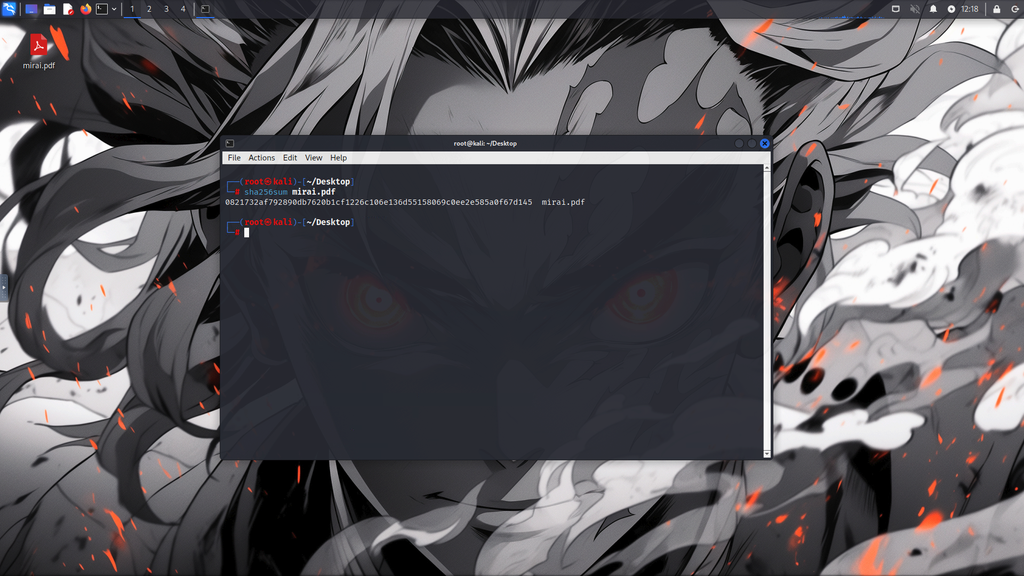
We can see that we were able to obtain a hash of the malware, which is the preferred method of sharing threat intelligence regarding malware, as the hash can be used to uniquely identify a specific file.
Strings
Not often, but sometimes, you will be able to extract a domain, command, or IP from the executable by just extracting all the text from the malware. For that, we have the Linux utility called strings <filename>, which will extract all of the ASCII text from the executable file, which we can use to look for some of the things that are going on inside the malware.
strings mirai.pdf
VirusTotal
Now, with the limited knowledge we have from the basic analysis, we can proceed to see if someone else has also analyzed the file or not. Quite often, it’s the case that someone else has already done an analysis and shared their findings. To find it, we utilize a site called VirusTotal.
It is used to aggregate results from multiple independent security scanners to determine whether a file is malicious or not. It’s not limited to a file; we can use domain names, IP addresses, upload files, and hashes to investigate whether a file is malware or not. But keep in mind that VirusTotal can produce false positives or false negatives as well.
Using the hash obtained from earlier, we can use VirusTotal to obtain results:
0821732af792890db7620b1cf1226c106e136d55158069c0ee2e585a0f67d145
Example: https://www.virustotal.com/gui/file/0821732af792890db7620b1cf1226c106e136d55158069c0ee2e585a0f67d145
At first glance, we will see a bunch of security vendor analysis mentions, alongside what they are labelled as. In our case, it’s trojan.gafgyt/mirai. If we switch to the Details tab, we will see more information, like the file name, file type, and first submission. Lastly, if we move to the Community tab, you will see comments from security researchers who had YARA signature rules to identify the malicious file.
Dynamic Analysis
Dynamic analysis is a giant elephant that requires a dedicated article. Running malware to observe and study its behaviour can be risky, especially as modern malware becomes more sophisticated. Some malware can detect virtual machines or sandbox environments and, as an anti-analysis technique, may stop execution, change its behaviour, or delay execution to outlast the limited runtime of automated scanners.
There have been cases where malware was able to escape the sandbox and infect the host, which is not ideal or safe in any case. In case this piqued your interest, 3 VMware Zero-Day Bugs Allow Sandbox Escape also highlights how sandbox escapes can put your device and files at great risk.
To somewhat counter this, we utilize online sandboxes, which run the malware in their own sandbox, removing the risk of getting our system infected. Along with their automated scanners, they produce results that could be missed by a human, but they are not a replacement for skills. As malware gets more advanced, the need for a skilled analyst becomes even more valuable.
There are multiple online sandboxes we can utilize to perform dynamic analysis. Here are some popular ones:
In our case, we will be using two of them, Hybrid Analysis and Joe Sandbox Cloud. Both of them have a simple and easy-to-use interface, which provides automated reports and gives us a clearer understanding of what the malware is doing.
Hybrid Analysis
As WannaCry malware is considered one of the most infamous malware attacks in recent history, we will look at the sample Ransomware.wannacry.exe, and we are starting off with Hybrid Analysis.
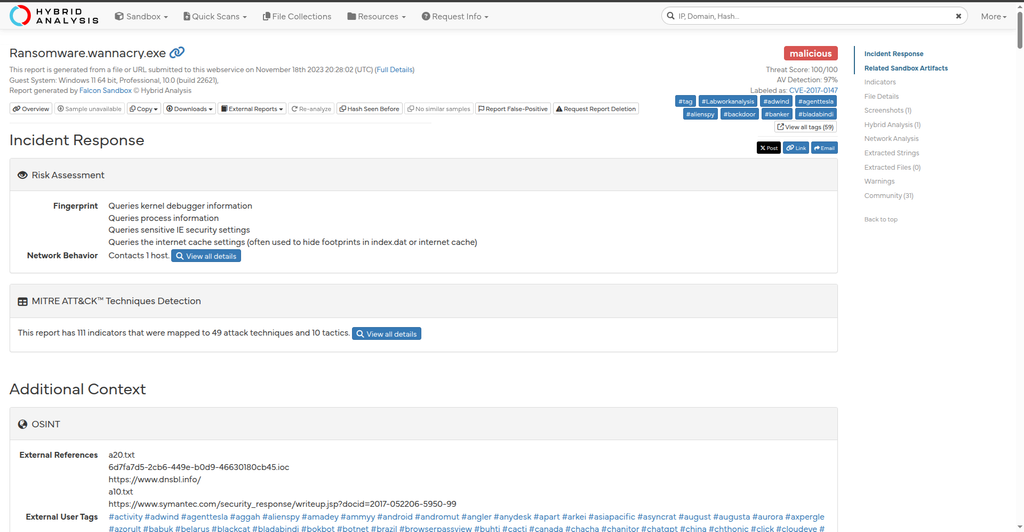
This platform also supports uploading a file as well as using a hash to analyze it in case it was analyzed before. In the generated report, there are a few important sections, such as the Indicators section, which contains all of the activities performed by the malware that are considered malicious and can be used to detect and remediate it.
Furthermore, you will see the File Details section, which has information about the file, such as the icon, compiler/packer being used, internal name, entry point, and much more. Aside from them, there are a few more networking activity sections, such as DNS requests and HTTP traffic, which could come in handy when writing detection rules.
Joe Sandbox Cloud
Now let’s run the same file through Joe Sandbox Cloud and see the way the report is produced. As far as the security scanners go, they have pretty similar results, but the report presentation can be easier to understand and visualize compared to Hybrid Analysis.
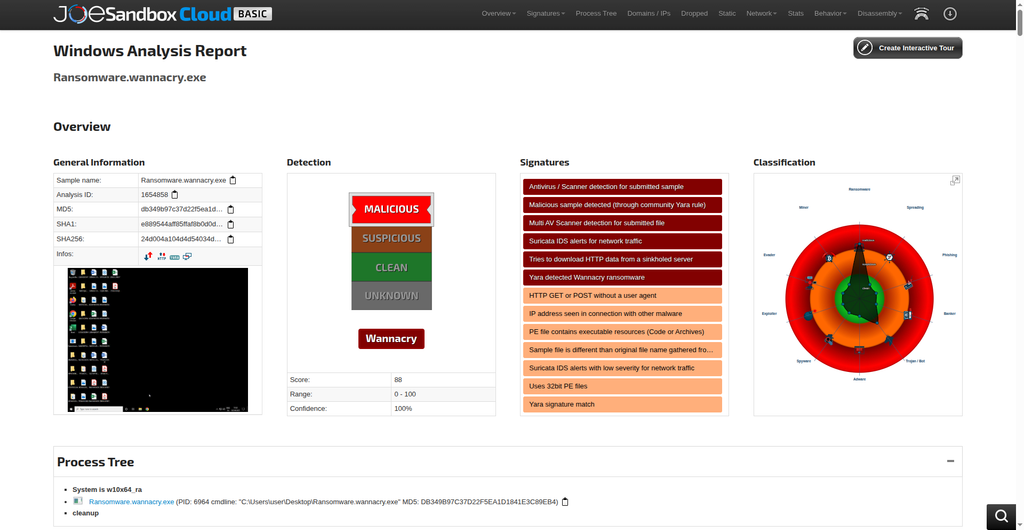
Example: https://www.joesandbox.com/analysis/1654858/0/html
One thing that already stands out is how it visualizes detection, classification, and signatures. You will notice a very cool thing about this platform: you get a Malware Threat Intel block, which contains a description of the file being run in the sandbox.
WannaCry is ransomware that contains a worm component enabled by the EternalBlue exploit. It attempts to use vulnerabilities in the Windows SMBv1 server to remotely compromise systems, encrypt files, and spread to other hosts. Systems that have installed the MS17-010 patch are not vulnerable to the exploits used. The spreading was stopped about 8 hours after the initial outbreak due to triggering a kill switch domain.
Furthermore, scrolling down, we can see that a majority of the information is quite similar to the Hybrid Analysis report, as they use somewhat the same methodology to perform the task. However, the presentation and a few details could be considered good differentiating factors.
Final Words
If you are a complete beginner, I would highly recommend analyzing older malware to learn and see what you missed, as you will find extensive resources online covering detailed descriptions about their analysis methodology and see the gaps in your understanding before moving to analyzing newer samples, as they are far more sophisticated. It can be very complicated to analyze them, and it could hinder your learning. Take baby steps before you can walk.
Good luck, Happy Hacking
Leave a Reply